
ChatGPT Multiple Profile Management: Enhance Your AI Conversations with Custom Personas
1. Introduction
Have you ever wished ChatGPT could adapt its communication style to different contexts? Imagine having a professional assistant for work, a creative partner for brainstorming, or a friendly tutor for learning—all within the same ChatGPT interface.
The challenge: ChatGPT's default one-size-fits-all approach limits its versatility across different use cases.
GPT X introduces Multiple Profile Management, a powerful feature that allows you to create, customize, and instantly switch between different AI personas and conversation styles, transforming how you interact with ChatGPT.
2. Understanding Multiple Profiles
Multiple profiles are comprehensive configurations that define how ChatGPT behaves and responds in conversations. Each profile includes:
- Name and Role Messages: Define how ChatGPT introduces itself and its role
- User Instructions: Custom guidance for how the AI should interact with you
- Personality Types: Pre-defined behavioral frameworks (e.g., Professional, Creative, Analytical)
- Personality Traits: Fine-tuned characteristics like formality, creativity, humor, and more
This multi-layered approach gives you unprecedented control over the AI's communication style and behavior.
3. Core Components of Profile Management
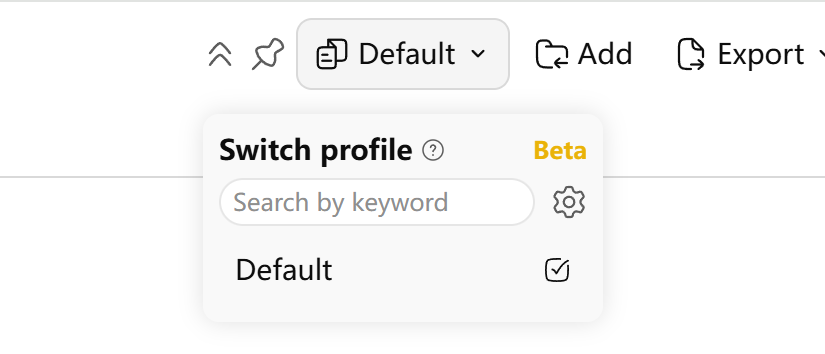
3.1 Multiple Profile Button - Quick Profile Switching
The entry point to profile management is an intuitive button in ChatGPT's interface:
- Current Profile Display: Shows the active profile name at a glance
- Quick Switch Dropdown: Instantly change profiles without leaving your conversation
- Search Functionality: Find profiles quickly when you have many saved
- Settings Access: One-click access to the profile management interface
3.2 Profile Config Manager - Your Profile Library
The manager is your central hub for organizing all profiles:
- Profile Listing: View all your custom profiles in a clean table format
- Search and Filter: Quickly find specific profiles by name or content
- Edit and Delete: Modify existing profiles or remove unused ones
- Create New: Launch the profile creation wizard
- Preview: See key details of each profile at a glance

3.3 Multiple Config Dialog - Profile Creation Wizard
This is where the magic happens—creating your custom AI personas:
Basic Configuration
- Profile Name: Give your profile a descriptive name
- Name User Message: How ChatGPT should introduce itself
- Role User Message: Define the AI's role and purpose
- Model Behavior: Instructions about how the AI should behave
- User Context: Information about you for personalized interactions
Personality Type Selection
Choose from predefined personality frameworks:
- Professional: Formal, structured, business-oriented
- Creative: Imaginative, innovative, artistic
- Analytical: Logical, data-driven, methodical
- Educational: Patient, explanatory, supportive
- And more specialized types...
Advanced Customization
Fine-tune personality traits with granular controls:
- Formality Level: From casual to highly formal
- Creativity: Conservative to highly creative
- Humor: Serious to witty and playful
- Conciseness: Detailed to brief and to-the-point
- Empathy: Technical to emotionally intelligent

4. Real-World Use Cases
4.1 Professional Work Environment
Create a "Business Consultant" profile:
- Formal tone and professional language
- Focus on actionable insights and recommendations
- Structured responses with clear headings
- Industry-specific knowledge and terminology
4.2 Creative Writing Sessions
Design a "Creative Writing Partner" profile:
- Encouraging and inspirational tone
- High creativity and imagination
- Familiarity with literary techniques
- Supportive feedback and suggestions
4.3 Educational Context
Build a "Patient Tutor" profile:
- Simple, clear explanations
- Encouraging and motivational
- Step-by-step problem-solving approach
- Ability to adjust complexity based on user level
4.4 Technical Development
Configure a "Senior Developer" profile:
- Technical terminology and best practices
- Code-focused responses with examples
- Problem-solving mindset
- Direct, efficient communication style
5. Technical Implementation
5.1 Seamless Integration
The profile system integrates directly with ChatGPT's native functionality:
- Real-time Switching: Change profiles mid-conversation without losing context
- Persistent Storage: Profiles are saved and synced across sessions
- API Integration: Works seamlessly with ChatGPT's underlying API
- Performance Optimized: Instant profile switching without delays
5.2 Data Management
- Cloud Storage: Profiles are stored securely and backed up
- Version Control: Track changes and revert to previous versions
- Import/Export: Share profiles with team members or backup locally
- Privacy Focused: Your custom prompts and preferences remain private
6. Benefits and Advantages
6.1 Increased Productivity
- Context Switching: Instantly adapt ChatGPT to different tasks
- Consistent Behavior: Maintain the same AI personality across similar tasks
- Reduced Prompting: Less need to repeatedly instruct ChatGPT on behavior
- Specialized Expertise: Tailor responses to specific domains or industries
6.2 Enhanced User Experience
- Personalization: Make ChatGPT feel like your personal assistant
- Comfort and Familiarity: Interact with personalities that match your preferences
- Reduced Friction: Skip the setup time for each new conversation type
- Professional Consistency: Maintain consistent communication style in business contexts
6.3 Creative Flexibility
- Experimentation: Try different approaches to the same problem
- Role-Playing: Simulate different perspectives and viewpoints
- Learning Adaptation: Adjust teaching styles based on subject matter
- Multi-Modal Communication: Switch between formal, casual, and technical styles
7. Getting Started
7.1 Installation and Setup
- Install GPT X browser extension
- Navigate to any ChatGPT conversation
- Click the Profile Switch button in the interface
- Create your first custom profile
7.2 Best Practices
- Start Simple: Begin with basic personality type selection
- Iterate and Refine: Adjust profiles based on actual usage
- Profile Naming: Use descriptive names for easy identification
- Regular Cleanup: Remove unused profiles to keep your library organized
7.3 Advanced Tips
- Template Creation: Build template profiles for common use cases
- A/B Testing: Compare different approaches with similar profiles
- Team Sharing: Export and share successful profiles with colleagues
- Contextual Switching: Change profiles mid-conversation for complex tasks
8. Future Developments
We're continuously enhancing the profile management system:
Upcoming Features
- AI-Assisted Profile Creation: Let ChatGPT help you design optimal profiles
- Behavioral Analytics: Insights into which profiles work best for different tasks
- Community Profiles: Share and discover profiles created by other users
- Dynamic Adaptation: Profiles that automatically adjust based on conversation context
- Integration with Other Tools: Connect profiles with project management and productivity apps
Technical Improvements
- Faster Switching: Reduced latency when changing between profiles
- Enhanced Customization: More granular controls over personality traits
- Backup and Sync: Improved cloud synchronization and backup options
9. Conclusion
GPT X' Multiple Profile Management transforms your ChatGPT experience from a one-size-fits-all tool into a versatile, adaptable assistant that can morph to meet your specific needs.
Key takeaways:
- Create unlimited custom AI personas for different contexts
- Switch between profiles instantly without losing conversation context
- Fine-tune personality traits for precise control over AI behavior
- Boost productivity by eliminating repetitive prompting and setup
- Enhance creativity and problem-solving with specialized AI perspectives
Whether you're a professional seeking consistent business communication, a creative looking for inspiration, or an educator wanting to personalize learning experiences, Multiple Profile Management gives you the power to shape ChatGPT's personality to perfectly match your needs.
Ready to revolutionize your ChatGPT experience? Install GPT X today and start creating your custom AI personas!